
Parish Observer · Candidate role
Candidate
Candidates review parish observer feedback and personal evaluation trends by month and ministry role.
What Candidate users do
- Module tile and recent observations on the candidate dashboard
- My Observer Evaluations grouped by month and ministry role
- Personal evaluation trends with filters by area
- Read-only feedback—candidates do not record observations
Screen walkthrough
Candidate screens
Swipe or use the controls to review each screen with a short description for indexing and training.
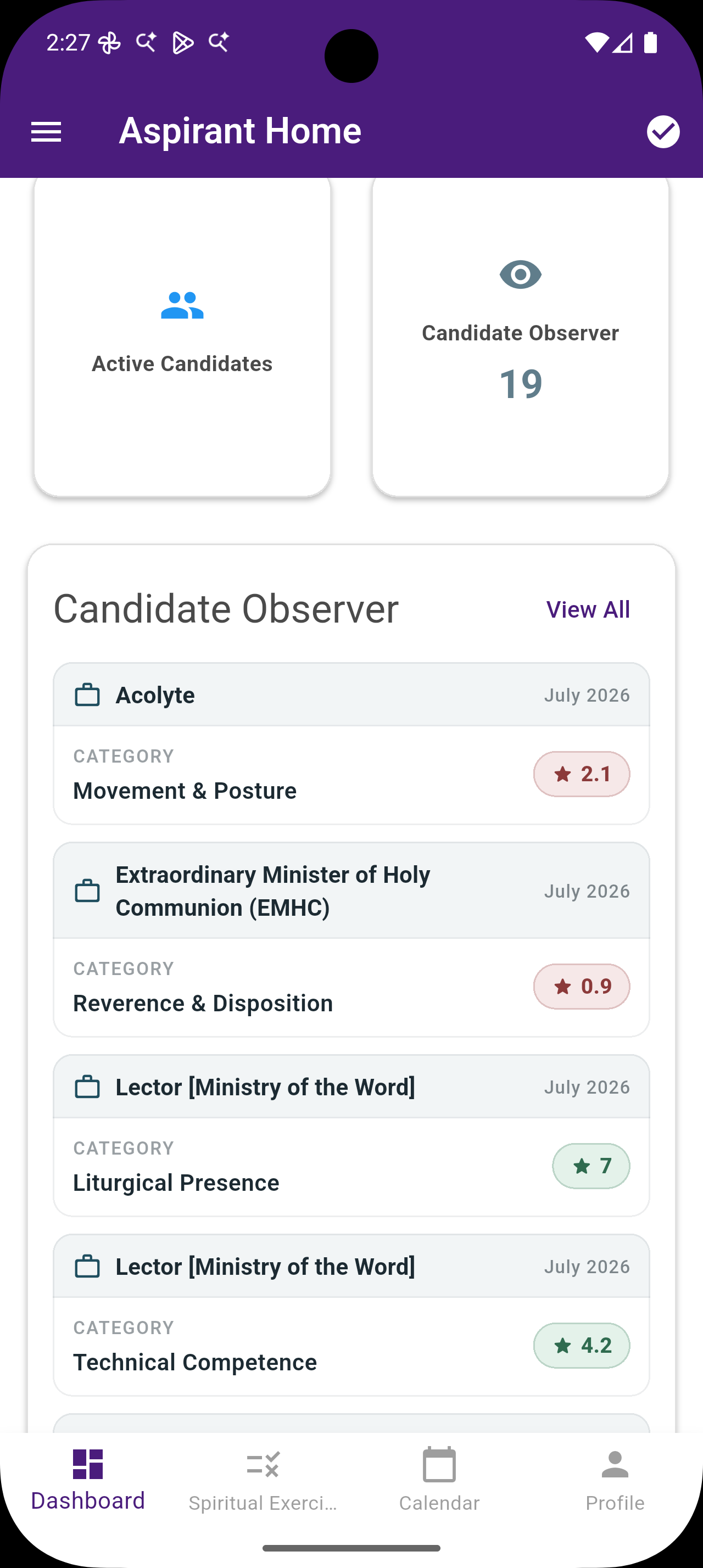
Candidate Observer Dashboard
From the cohort home, the Candidate Observer module shows observation counts and recent feedback—including who observed the candidate and average scores—so growth in parish ministry stays visible.
- Candidate Observer Dashboard From the cohort home, the Candidate Observer module shows observation counts and recent feedback—including who observed the candidate and average scores—so growth in parish ministry stays visible.
- My Observer Evaluations Candidates open their own evaluations grouped by month, then by ministry role and category. Empty states explain that feedback appears when parish observers submit observations.
- Evaluation Trends Personal trend charts help candidates see how scores move over time across ministry roles, supporting reflection with their formation team.
- Filter Trends by Area Filter trend series by ministry role or observation area to focus on a specific ministry—for example Lectorship—when preparing for formation conversations.
Related roles