
Formation Assistant

Spiritual Director

Walk with assigned candidates and spouses—only the modules they choose to share. The diocese assigns a director; directees share modules from Permissions; directors add private notes the formation team never sees.
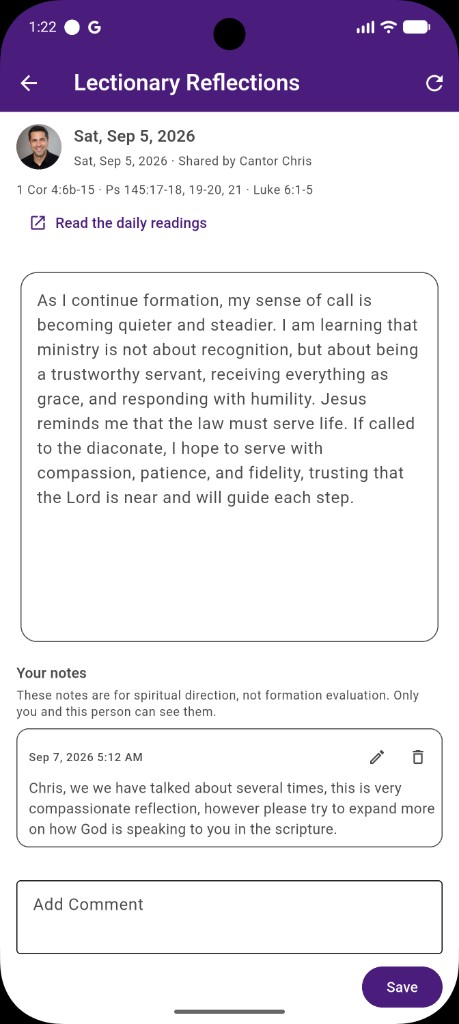
Internal forum, in the app

  • Diocese assigns directors from an approved roster—candidate and spouse independently
  • Directees share by module: lectionary reflections, spiritual-exercise reflections, monthly discernment topics, and the spiritual log
  • Directors open My Candidates, then only shared modules, then entry detail with their own notes
  • Unshare hides every entry in that module from the director immediately, including history
  • Director notes are never shown to Formation Team, parish formators, or diocese admins
Back to Formation Assistant
Spiritual director notes on a shared lectionary reflection in Formation Assistant

Screen walkthrough

Spiritual Director screens

Swipe or use the controls to review each screen with a short description.
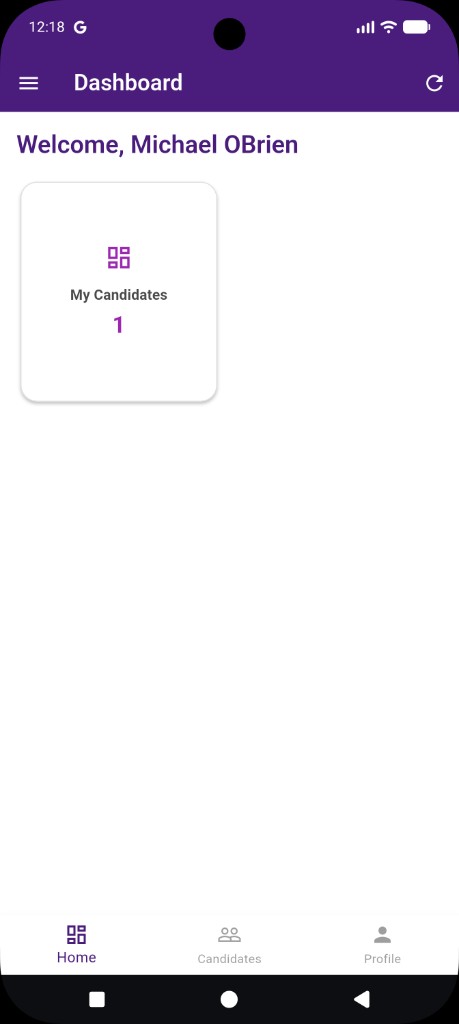
  1. Director dashboard The Spiritual Director home shows My Candidates—the people the diocese assigned to you.
  2. Shared modules Open a directee to see only the modules they chose to share—lectionary, discernment topics, spiritual-exercise reflections, and the spiritual log.
  3. Lectionary reflections Browse shared daily reflections by date, search the text, and filter by month or year.
  4. Private notes on a reflection Read the entry and add notes that are for spiritual direction, not formation evaluation. Only you and this person can see them.
  5. Monthly discernment topics See shared monthly topic reflections grouped by date, with the same search and filters.
  6. Topic and reflection Open a topic to read the candidate’s reflection, then add a private note when you are ready.
  7. Spiritual exercises reflections Review monthly spiritual-exercise reflections tied to formation events.
  8. Spiritual log See completed practices for a shared day and leave a note beside the log entry.

Why it matters

Spiritual Director

For directors

A dedicated home lists assigned people. Open a directee to see only what they shared, then add or edit your own notes.

For candidates and spouses

Profile shows the assigned director as read-only. Share or unshare modules from Permissions when you are ready. You keep director notes even after unshare.

Not a cohort tile

Spiritual direction is a role home, not a Candidate/Spouse dashboard tile. Assignment and sharing are the workflow—leave the module tile off homes.

An unhandled error has occurred. Reload 🗙